
Treat Learning Videos as Performance Support
When we run into everyday work problems, from hunting for an Excel formula to drafting a financial report, our first reflex is to open Google, YouTube, or type a prompt…

Why Shifting the Focus of Learning Reduces Cognitive Load
When we run into everyday work problems—whether it's hunting for an Excel formula or drafting a financial report—our first reflex is to open Google, YouTube, or type a prompt into a GenAI tool. We're used to getting an instant, specific solution the moment we hit a specific problem.
Unfortunately, that same convenience isn't there when an employee enters onboarding. Long classroom sessions or lengthy videos tend to be exhausting and drain focus instead. New hires are expected to memorize nearly every detail of the corporate learning curriculum in a short span of time.
In reality, forcing employees to memorize complex administrative processes in their first week on the job is deeply ineffective. It's time for L&D and HR practitioners to shift their focus from memorization to problem-solving.
At Monkey Melody, we believe that by turning long onboarding videos into a searchable ecosystem of micro-videos, companies can create just-in-time learning that functions as daily performance support for employees.
The traditional approach to onboarding often treats training as a one-time event. Employees sit through several weeks of sessions, complete all the video modules, and are then considered done. But what actually needs to be measured is how effectively employees apply what they've learned out in the field.
According to the well-known Ebbinghaus Forgetting Curve in cognitive psychology, people forget roughly 70% to 80% of new information within 24 hours if there's no repetition or immediate application. Picture a new employee taught on day three of onboarding how to enter vendor data into the company's complex ERP system. But Budi isn't assigned to enter his first vendor data until day 25.
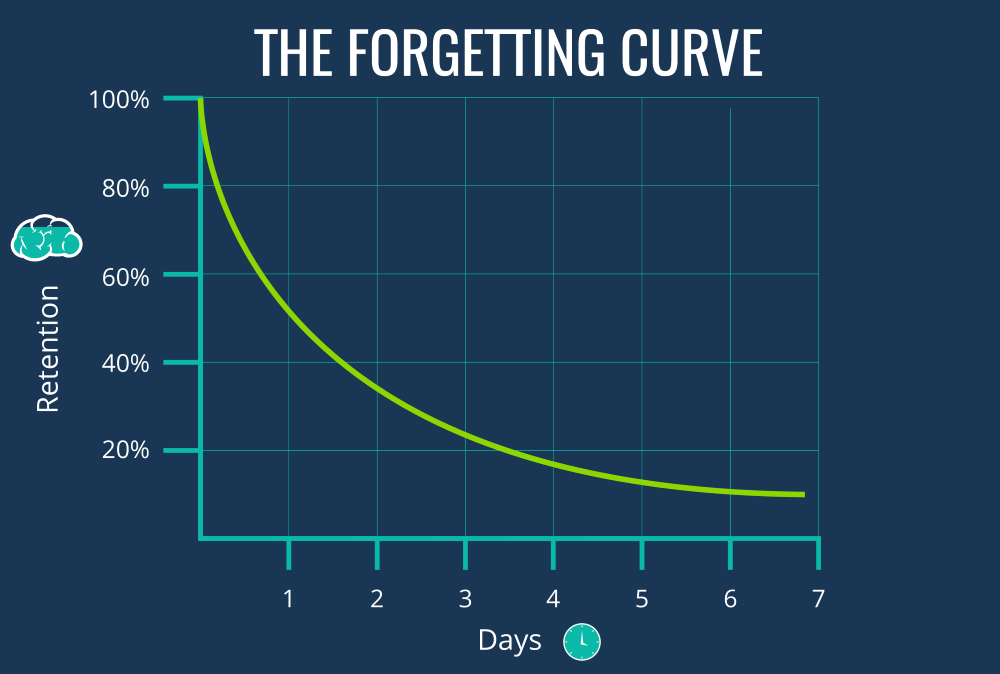
By then, that employee has likely forgotten the specific steps shown in the video. A lot of time ends up being wasted, and productivity drops.
When training is treated as a single event at the start of someone's tenure, L&D is effectively ignoring Cognitive Load Theory. Human working memory capacity is extremely limited. Flooding new employees with too much technical information in a short period won't produce retention—it will only produce mental fatigue and lower operational efficiency in the long run.
Understanding the Difference Between Training and Performance Support
To solve this retention problem, HR practitioners and instructional designers need to understand a very clear distinction between Training and Performance Support.
- Training
Training is ideal for shaping mindsets, building company culture, teaching soft skills like leadership or negotiation, and providing the "why" behind what the company does. Onboarding videos covering the company's founding history, core values, vision and mission, or work ethics are exactly the right material for Training. Employees need to absorb this information to feel connected to the organization's identity.
- Performance Support
Performance Support systems, on the other hand, are designed specifically to answer the question of how to do something. They take the form of tools employees can access at the exact moment they're doing the task in question—for example, "How do I process this specific invoice in SAP?" or "How do I submit annual leave on the new HRIS portal?"
Forcing employees to watch a video on processing invoices in their first week, before they have an invoice to process, is a waste of effort. For this kind of procedural, technical knowledge, what's needed isn't traditional training—it's performance support. Employees don't need to memorize every step; they just need quick, easily accessible visual guidance.
So how do we build effective performance support? The answer is to adopt habits employees already have outside of work hours.
- Instead of a single 45-minute video titled "The Complete Guide to Using the ERP System," it's far better to have 15 separate videos, each 2 to 3 minutes long, with very specific, action-oriented titles, such as:
- • How to Add a New Vendor to the ERP
- • How to Change a Payment Status in the ERP
- • How to Export a Monthly Report From the ERP
- But simply cutting the video into pieces isn't enough. For this strategy to work and become genuinely effective learning video content, several technical and design elements need to be applied:
- • Strong Metadata and Tagging: Every micro-video needs relevant tags, keywords, and descriptions. If your LMS has a search feature, employees should be able to type "Vendor" or "Invoice" and immediately find the 2-minute video they need at the top of the results.
- • Searchable Transcripts: Modern learning platforms let employees search for a specific word inside a video. The employee is taken straight to the exact minute and second—say, 01:45—where that word is spoken, eliminating the need to watch the video from the start.
- • Mobile-First Design: Work doesn't always happen at a desk. Field staff, factory technicians, or sales teams need solutions they can pull up on their smartphones. This micro-video ecosystem needs to be optimized for mobile, with responsive UI/UX so videos load quickly without eating up data.
- • Clear, Engaging Visuals: Since these videos function as direct guidance, make sure screen recordings are crisp. Use visual annotations (arrows, highlights, red boxes) to guide the viewer's eye straight to the button they need to click.
- When all these elements come together, L&D has successfully built a learning ecosystem that acts as a personal coach ready to help every employee. That's the essence of providing daily performance support.
After producing more than 1,000 learning multimedia pieces, Monkey Melody understands that every company faces different challenges and goals. That's why we offer a tailored approach to ensure every video we create achieves the intended training objective. Using the latest technology and a creative approach, we're ready to help your company tackle the training challenges of the future.
More insights
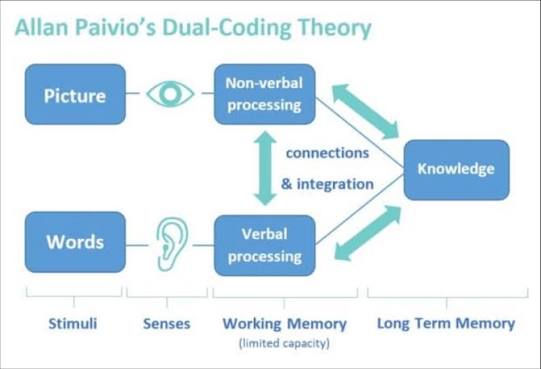
Research on Interactive Video Among Biology Students
The use of video as a self-paced e-learning medium has become standard practice in corporate training programs and higher education.
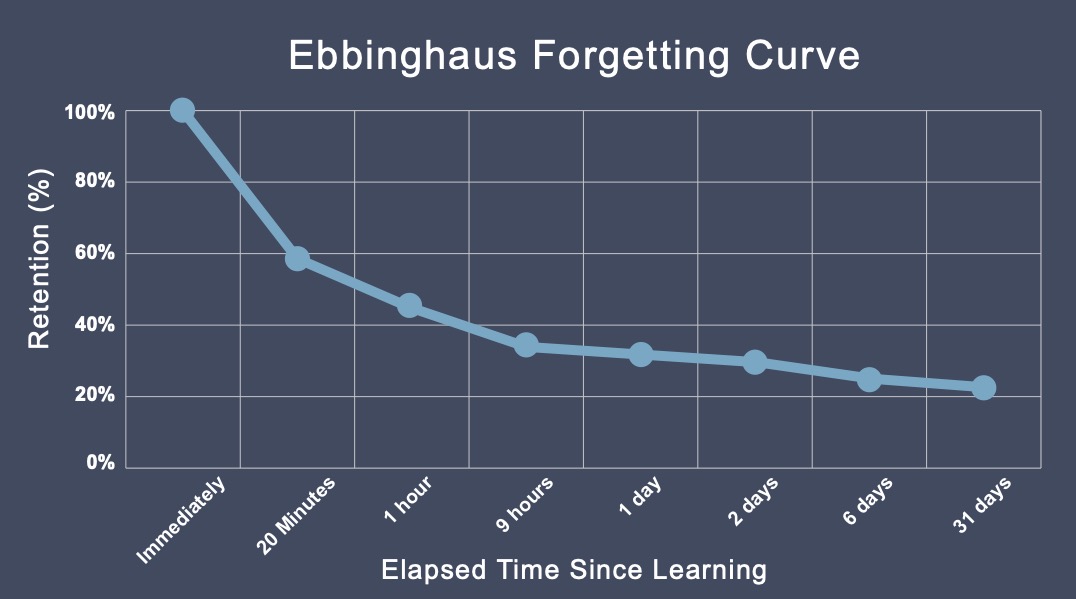
The Science Behind Why Microlearning Works
A single long training day often fails because it fights how the brain actually works — see how microlearning, the Forgetting Curve, and spaced repetition make material actually stick.
How AI Video Search Is Transforming Corporate L&D
Thousands of hours of training video pile up in your company's LMS, hard to search once a program ends — see how AI Video Search is changing the way L&D teams find specific moments buried in that dark data.
Want the short version, applied to your company?
Let's talk about what this means for you.
Get in touch